Module Management
In most PowerShell scripts, including those used with a ScriptoForm project, PowerShell modules provide additional, required, functionality to the script. For example the VMware VCF.PowerCLI module might be needed to connect to and manage a VMware vCenter instance and the Microsoft ActiveDirectory module might be used create user and group objects in a corporate Active Directory domain.
Natively, PowerShell provides a robust system to test for required modules and prevent the script from running if one or more of those modules are missing. However, this mechanism is not conducive for use with a ScriptoForm - especially if compiled into an executable format. To help manage missing PowerShell module testing and notification in the unique graphical environment of a ScriptoForm, and prevent the Form from being displayed if any required modules are missing, use the following (or similar) process instead:
- In the Settings region of the ScriptoForm script file, create an array of all required modules called
$REQUIRED_MODULES. Use the exact name for each module that is required.Settings Region #region Settings$REQUIRED_MODULES = @("ActiveDirectory", "Azure")$SUPPORT_CONTACT = "Smart Ace Designs"#endregion - In the Main region of the ScriptoForm script file, test for the presence of each module and add the name of the module to the
$MissingModulesarray if missing.Main Region #region Main$MissingModules = @()foreach ($Module in $REQUIRED_MODULES){if ($REQUIRED_MODULES -notcontains $(Get-Module -ListAvailable -Name $Module | Get-Unique)) {$MissingModules += $(" $([char]8226) " + $Module)}}Invoke-Command -ScriptBlock $ShowFormMain#endregion - In the Main region of the ScriptoForm script file, display a MessageBox if any modules are missing, otherwise display the Main Form.
Main Region #region Main$MissingModules = @()foreach ($Module in $REQUIRED_MODULES){if ($REQUIRED_MODULES -notcontains $(Get-Module -ListAvailable -Name $Module | Get-Unique)) {$MissingModules += $(" $([char]8226) " + $Module)}}if ($MissingModules){[void][System.Windows.Forms.MessageBox]::Show("The following PowerShell modules are required:`n`n$($MissingModules -join `"`n`")`n`nPlease contact $SUPPORT_CONTACT for technical support.","Requirements",[System.Windows.Forms.MessageBoxButtons]::OK,[System.Windows.Forms.MessageBoxIcon]::Information)}else{Invoke-Command -ScriptBlock $ShowFormMain}#endregion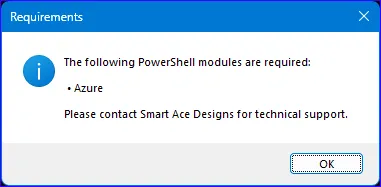
- Save the changes to the file.
- If using the optional compiled executable with the ScriptoForm, recompile the executable.