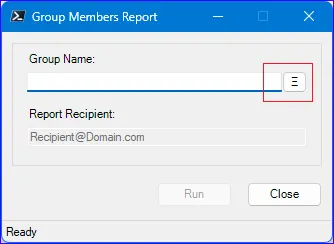
Form Layout
As a ScriptoForm developer, you will need to add various controls to your Form in a meaningful layout and with appropriate sizes. To help you with this process, the following guidelines, best practices, and tools can be used.
Form Size
Section titled “Form Size”The size of of a ScriptoForm Form is fixed at runtime ([System.Windows.Forms.FormBorderStyle]::FixedSingle) and cannot be changed by the user. However the intitial size can be adjusted as needed to meet your design requirements.
The initial width and height of a ScriptoForm is controled by the $FormHeight and $FormWidth variables in the $ShowFormMain script block. The default width is 330 units but the height is set when using the New-SADScriptoFormProject function to build a new ScriptoForm. For more information see the Form Sizes article.
If you modify the Form width value ($FormWidth) then any interactive control you add or have added to the Form using a ScriptoForm VS Code snippet (see below) will automatically grow to match the new width. These snippets are designed to set the control width dependant on the $FormWidth variable.
$TextBoxServerName.Location = New-Object -TypeName System.Drawing.Point(15,35)$TextBoxServerName.Size = New-Object -TypeName System.Drawing.Size(($FormWidth - 50),20)$TextBoxServerName.TabIndex = 0$TextBoxServerName.CharacterCasing = [System.Windows.Forms.CharacterCasing]::Upper$TextBoxServerName.MaxLength = 15$TextBoxServerName.Add_TextChanged($TextBoxServerName_TextChanged)$GroupBoxMain.Controls.Add($TextBoxServerName)Control and Control Pair Spacing
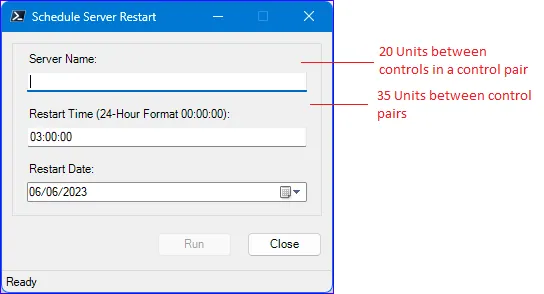
Section titled “Control and Control Pair Spacing”In a ScriptoForm, most controls come as a pair (an interactive control, such as a TextBox or ComboBox, and its paired Label control) which are collectively known as a control pair. A standard ScriptoForm is designed such that:
- The horitizonl location (start position) of controls and control pairs is
15. - The horizontal width of interactive controls is controlled by the
$FormWidthvariable in the$ShowFormMainscript block. This ensures the the width of all interactive controls adjust to the width of the Form and provides for a right edge padding to match the left edge padding of15units. - Label controls do not have a predefined width and will grow as needed (
AutoSize = $true) based on the text length. - The vertical space between controls in a control pair is always
20units. - The vertical space between control pairs or individual controls (those without a Label) is always
35units.
VS Code Snippets
Section titled “VS Code Snippets”The Visual Studio Code snippets JSON file takes advantage of this standardization by including hints in the “Location” properties of control pairs to help you properly place them on a Form. As you tab through the control pair snippet, you will eventually land on the “hint” for the height value of the location property (the vertical location of the control within the Form) at which time you will need to provide a value based on the control pair you adding: the vertical location of a Label is always in relation to the previous control pair above it and the height of the interactive control is always in relation to its paired Label control.
The “15|P+35” hint
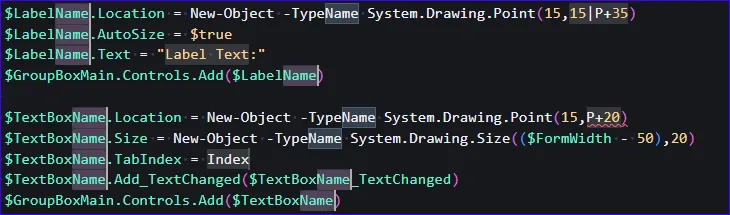
Section titled “The “15|P+35” hint”This hint it typically used to determine the vertical location of a Label in a control pair relative other controls or control pairs:
When adding the very first control pair to the form, use 15 for the height of the Label. For all other control pairs, use 35 plus the height of the previous interactive control to determine the height of the new Label control you are adding.
The “P+20” hint
Section titled “The “P+20” hint”This hint it typically used to determine the vertical location of the interactive control in a control pair below its paired Label:
Use 20 plus the vertical location of its paired Label control.
The “P-1” hint
Section titled “The “P-1” hint”This hint is unique to the “Label & TextBox & Search Button” control group, which has three controls in it.