Label
In a ScriptoForm, the Microsoft .NET Label class is a control used to provide descriptive text for another control on the Form. For example, a Label can be used to add descriptive text for a TextBox control to inform the user about the type of data expected in the control. A Label control is usually paired with another control such as a TextBox or ComboBox. Both the control and associated Label would share a common word in the PowerShell variable name, such as “ServerName”, to easily identify them as a pair.
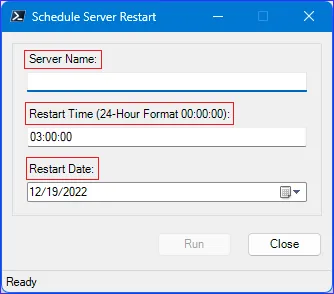
In the ScriptoForm PowerShell script file, a control and its associated Label should be instantiated in the Controls region and then defined within the Forms script block. By convention, this control pair should be nested in the
$GroupBoxMain GroupBox container.The steps needed to implement a Label control with a ScriptoForm include:
- Instantiate a Label object to be paired with another control that requires a label in the Controls region.
Suggested name format: $LabelName | $ControlTypeName - Assign the required properties to the Label object in the Forms region.
Examples
Section titled “Examples”- Instantiate a new
System.Windows.Forms.TextBoxandSystem.Windows.Forms.Labelcontrol pair:Controls Region $LabelServerName = New-Object -TypeName System.Windows.Forms.Label$TextBoxServerName = New-Object -TypeName System.Windows.Forms.TextBox - Assign properties to the pair and add them to the GroupBox object:
Forms Region | $FormMain $LabelServerName.Location = New-Object -TypeName System.Drawing.Point(15,15)$LabelServerName.AutoSize = $true$LabelServerName.Text = "Server Name:"$GroupBoxMain.Controls.Add($LabelServerName)$TextBoxServerName.Location = New-Object -TypeName System.Drawing.Point(15,35)$TextBoxServerName.Size = New-Object -TypeName System.Drawing.Size(($FormWidth - 50),20)$TextBoxServerName.TabIndex = 0$GroupBoxMain.Controls.Add($TextBoxServerName)