ComboBox
In a ScriptoForm, the Microsoft .NET ComboBox class is a control that allows a user to interactively select one of multiple items from a drop-down style list. This selected text or index can be used to control or provide a parameter to actions performed by a ScriptoForm.
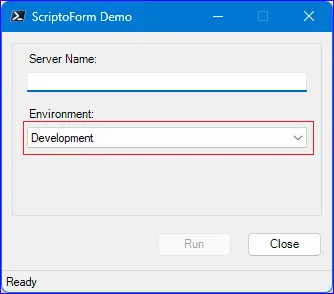
In a ScriptoForm PowerShell script file, a ComboBox control should be instantiated in the Controls region and then defined within the Forms script block. A ComboBox is usually paired with a matching Label control. If using the ScriptoForm VS Code snippets, the ScriptoForm Controls: Label & ComboBox snippet can be used to instantiate this control pair and the ScriptoForm Properties: Label & ComboBox snippet can be used to assign a default set of properties to them. By convention, this control pair should be nested in the
$GroupBoxMain GroupBox container.The steps needed to implement a ComboBox control with a ScriptoForm include:
- Instantiate a ComboBox object and an associated Label object in the Controls region.
Suggested name format: $LabelName | $ComboBoxName - Assign the required and any optional properties to the ComboBox object in the Forms region.
- Assign Event Handlers to the ComboBox object in the Forms region.
- Add the control pair to a GroupBox object in the Forms region.
- Define event handlers for the ComboBox with script blocks in the Handlers region.
- Add an initial list of items to the ComboBox in an appropriate event handler in the Handlers region, as needed.
- Modify the list of items in the ComboBox with appropriate event handlers in the Handlers region, as needed.
- Utilize the value of the ComboBox
Textfield with appropriate event handlers in the Handlers region, as needed.
Examples
Section titled “Examples”- Instantiate a new
System.Windows.Forms.ComboBoxandSystem.Windows.Forms.Labelcontrol pair:Controls Region $LabelEnvironment = New-Object -TypeName System.Windows.Forms.Label$ComboBoxEnvironment = New-Object -TypeName System.Windows.Forms.ComboBox - Assign properties to the pair, the event handler listener to the ComboBox object, and add the pair to the GroupBox object:
Forms Region | $ShowMainForm $ShowFormMain ={$LabelEnvironment.Location = New-Object -TypeName System.Drawing.Point(15,70)$LabelEnvironment.AutoSize = $true$LabelEnvironment.Text = "Environment:"$GroupBoxMain.Controls.Add($LabelEnvironment)$ComboBoxEnvironment.Location = New-Object -TypeName System.Drawing.Point(15,90)$ComboBoxEnvironment.Size = New-Object -TypeName System.Drawing.Size(($FormWidth - 50),20)$ComboBoxEnvironment.TabIndex = 1$ComboBoxEnvironment.DropDownStyle = [System.Windows.Forms.ComboBoxStyle]::DropDownList$ComboBoxEnvironment.Add_SelectedIndexChanged($ComboBoxEnvironment_SelectedIndexChanged)$GroupBoxMain.Controls.Add($ComboBoxEnvironment)} - Add items to the ComboBox object and set the default index for it:
Handlers Region | $FormMain_Load $FormMain_Load ={if (Test-Path -Path $EnvironmentsFile){$ComboBoxEnvironment.Items.AddRange($(Get-Content -Path $EnvironmentsFile))$ComboBoxEnvironment.SelectedIndex = 0}} - Create the event handler for the ComboBox object:
Handlers Region | $ComboBoxEnvironment_SelectedIndexChanged $ComboBoxEnvironment_SelectedIndexChanged ={if ($ComboBoxEnvironment.Text = "Production"){$TextBoxEmailAddress.Enabled = $true}} - Use the
Textproperty of ComboBox object to retrive the current value:Forms Region | $ShowMainForm $Environment = $ComboBoxEnvironment.Text
The
DropDownStyle property of a ComboBox determines one of three ComboBoxStyle behaviors the ComboBox will exhibit. Typically, in a ScriptoForm, the DropDownList style is used, which indicates the list is non-interactive and cannot be modified by the user.$ComboBoxEnvironment.DropDownStyle = [System.Windows.Forms.ComboBoxStyle]::DropDownList