ToolStripStatusLabel
In a ScriptoForm, the Microsoft .NET ToolStripStatusLabel class is a control that can contain be embedded into a StatusStrip control and is used to display status information or progress to the user while the ScriptoForm is running. A ToolStripStatusLabel can display text, an icon, or both.
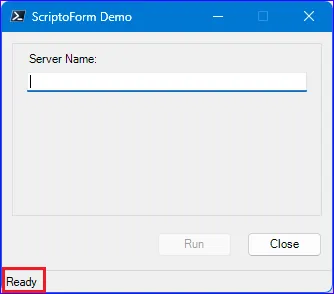
When a new ScriptoForm is built using the New-SADScriptoFormProject function, a default ToolStripStatusLabel control (
$ToolStripStatusLabelMain) is provisioned in the script. A ToolStripStatusLabel must be embedded in a StatusStrip object and in the case of a default ScriptoForm it is embedded in the $StatusStripMain object. However, an additional ToolStripStatusLabel may need to be created for use with each secondary Form added to the ScriptoForm.The steps needed to implement a ToolStripStatusLabel control with a ScriptoForm include:
- Instantiate a ToolStripStatusLabel object in the Controls region.
Suggested name format: $ToolStripStatusLabelName - Add the ToolStripStatusLabel object to StatusStrip control in the Forms region.
- Assign the
Textproperty to the ToolStripStatusLabel object with the$FormMain_Shownevent handler in the Handlers region. An event handler it typically used for this process to allow for possible state changes while the script is loading and connecting to remote resources. For example the text “Connecting to VMware vCenter instance…” may need to displayed while the script is initializing prior to setting it to “Ready”.
Examples
Section titled “Examples”- Instantiate a new
System.Windows.Forms.StatusStripobject:Controls Regions $ToolStripStatusLabelMain = New-Object -TypeName System.Windows.Forms.ToolStripStatusLabel - Add a ToolStripStatusLabel control to the StatusStrip object:
Forms Region | $ShowMainForm $StatusStripMain.SizingGrip = $false$StatusStripMain.Font = New-Object -TypeName System.Drawing.Font("MS Sans Serif",8)[void]$StatusStripMain.Items.Add($ToolStripStatusLabelMain)$FormMain.Controls.Add($StatusStripMain) - Add the text property value to the ToolStripStatusLabel object:
Handlers Region | $FormMain_Shown $FormMain_Shown ={$ToolStripStatusLabelMain.Text = "Ready"$StatusStripMain.Update()$FormMain.Activate()}
The
Text property value of a ToolStripStatusLabel object can be updated when the state of the ScriptoForm changes. For example when the user clicks the “Run” button, the property can be updated to indicate a long running process is executing. When the process has completed, the property can be set back to the default Ready value.The steps needed to update the text of a ToolStripStatusLabel control include:
- Set the
Textproperty of the ToolStripStatusLabel object prior to executing an action in an Event Handler of a control in the Handlers region. - Perform the action in the Event Handler of the control in the Handlers region.
- Set the
Textproperty of the ToolStripStatusLabel object back to the default state (“Ready”) after the action has completed in an Event Handler of a control in the Handlers region.
- Set the
Textproperty of the ToolStripStatusLabel object:Handlers Regions | $ButtonRun_Click $ButtonRun_Click ={$ToolStripStatusLabelMain.Text = "Working...please wait"$FormMain.Controls | Where-Object {$PSItem -isnot [System.Windows.Forms.StatusStrip]} | ForEach-Object {$PSItem.Enabled = $false}$FormMain.Cursor = [System.Windows.Forms.Cursors]::WaitCursor[System.Windows.Forms.Application]::DoEvents()try{Start-Sleep -Seconds 2[void][System.Windows.Forms.MessageBox]::Show("Action complete.","Results",[System.Windows.Forms.MessageBoxButtons]::OK,[System.Windows.Forms.MessageBoxIcon]::Information)}catch{[void][System.Windows.Forms.MessageBox]::Show($PSItem.Exception.Message + "`n`nPlease contact $SUPPORT_CONTACT for technical support.","Exception",[System.Windows.Forms.MessageBoxButtons]::OK,[System.Windows.Forms.MessageBoxIcon]::Warning)}$FormMain.Controls | ForEach-Object {$PSItem.Enabled = $true}$FormMain.ResetCursor()$TextBoxServerName.Clear()$TextBoxServerName.Focus()$ToolStripStatusLabelMain.Text = "Ready"$StatusStripMain.Update()} - Allow the action execution to complete.
- Set the
Textproperty of the ToolStripStatusLabel object to the normal state:Handlers Regions | $ButtonRun_Click $ButtonRun_Click ={$ToolStripStatusLabelMain.Text = "Working...please wait"$FormMain.Controls | Where-Object {$PSItem -isnot [System.Windows.Forms.StatusStrip]} | ForEach-Object {$PSItem.Enabled = $false}$FormMain.Cursor = [System.Windows.Forms.Cursors]::WaitCursor[System.Windows.Forms.Application]::DoEvents()try{Start-Sleep -Seconds 2[void][System.Windows.Forms.MessageBox]::Show("Action complete.","Results",[System.Windows.Forms.MessageBoxButtons]::OK,[System.Windows.Forms.MessageBoxIcon]::Information)}catch{[void][System.Windows.Forms.MessageBox]::Show($PSItem.Exception.Message + "`n`nPlease contact $SUPPORT_CONTACT for technical support.","Exception",[System.Windows.Forms.MessageBoxButtons]::OK,[System.Windows.Forms.MessageBoxIcon]::Warning)}$FormMain.Controls | ForEach-Object {$PSItem.Enabled = $true}$FormMain.ResetCursor()$TextBoxServerName.Clear()$TextBoxServerName.Focus()$ToolStripStatusLabelMain.Text = "Ready"$StatusStripMain.Update()}
References
Section titled “References”ToolStripStatusLabel Class (System.Windows.Forms) | Microsoft Learn