StatusStrip
In a ScriptoForm, the Microsoft .NET StatusStrip class is a container based control that can contain other child controls which display status information or progress to the user while the ScriptoForm is running. Typically a StatusStrip control consists of one or more ToolStatusStripLabel child controls each of which can display text, an icon, or both. Other possible child controls include:
These additional child controls have not been tested for use with a ScriptoForm are out of scope for this documentation.
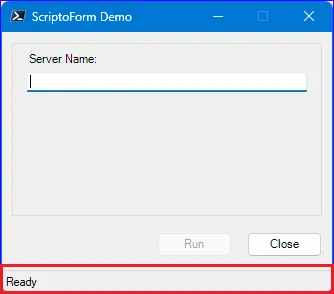
When a new ScriptoForm is built using the New-SADScriptoFormProject function, a default StatusStrip control is provisioned in the script. Normally, most interaction with this control will instead involve updating the
$ToolStripStatusLabelMain child control. However, an additional StatusStrip may need to be created for use with each secondary Form added to the ScriptoForm.The steps needed to implement a StatusStrip control with a ScriptoForm include:
- Instantiate a StatusStrip object in the Controls region.
Suggested name format: $StatusStripName - Assign the required properties to the StatusStrip object in the Forms region.
- Add the StatusStrip object to a Form object in the Forms region.
- Add at least one ToolStatusStripLabel child control to the StatusStrip object in the Forms region.
Examples
Section titled “Examples”- Instantiate a new
System.Windows.Forms.StatusStripobject:Controls Regions $StatusStripMain = New-Object -TypeName System.Windows.Forms.StatusStrip - Assign properties to the StatusStrip object and add it to the Form object:
Forms Region | $ShowMainForm $StatusStripMain.SizingGrip = $false$StatusStripMain.Font = New-Object -TypeName System.Drawing.Font("MS Sans Serif",8)$FormMain.Controls.Add($StatusStripMain) - Add a ToolStripStatusLabel control to the StatusStrip object:
Forms Region | $ShowMainForm $StatusStripMain.SizingGrip = $false$StatusStripMain.Font = New-Object -TypeName System.Drawing.Font("MS Sans Serif",8)[void]$StatusStripMain.Items.Add($ToolStripStatusLabelMain)$FormMain.Controls.Add($StatusStripMain)
- Because a default ScriptoForm Form is not resizable, the
SizingGripproperty of a StatusStrip object is normally set to$false:
$StatusStripMain.SizingGrip = $false
This can be changed if the Form is set to be resizable. - A StatusStrip object does not inherit the font properties set on the parent Form object. In order to provide a uniform appearance, the font must be set explicitly on the StatusStrip object to match that of the Form and other controls:
$StatusStripMain.Font = New-Object -TypeName System.Drawing.Font("MS Sans Serif",8)