ListView
In a ScriptoForm, the Microsoft .NET ListView class is a control that is used to display a collection of items represented by icons and/or text. These items can be interactive giving the user the ability to double-click an item to perform an action within the ScriptoForm. Items within a ListView can be divided into separate groups by using a ListViewGroup object to group items by a useful category.
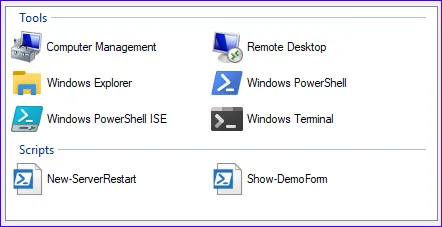
In a ScriptoForm PowerShell script file, a ListView control should be instantiated in the Controls region and then defined within the Forms script block. A ListView is not usually paired with a matching Label control, but can be if needed. By convention, a ListView control should be nested in the
$GroupBoxMain GroupBox container.The steps needed to implement a ComboBox control with a ScriptoForm include:
- Instantiate a ListView object in the Controls region.
Suggested name format: $ListViewName - Instatiate one or more ListViewGroup objects to separate groups of items in the ListView in the Forms region, as needed.
- Assign the required and any optional properties to the ListBox object in the Forms region.
- Add the ListView object to a GroupBox object in the Forms region.
- Define event handlers for the ListView with script blocks in the Handlers region.
Examples
Section titled “Examples”- Instantiate a new
System.Windows.Forms.ListViewandSystem.Windows.Forms.ListViewGroupobjects:Controls Region $ListViewItems = New-Object -TypeName System.Windows.Forms.ListView$ListViewGroupTools = New-Object -TypeName System.Windows.Forms.ListViewGroup$ListViewGroupScripts = New-Object -TypeName System.Windows.Forms.ListViewGroup - Assign properties and event handler listeners to the ListView object add it to the GroupBox object:
Forms Region | Forms Region | $ShowMainForm $ListViewItems.Anchor = "Top,Bottom,Left,Right"$ListViewItems.MultiSelect = $false$ListViewItems.ContextMenuStrip = $ContextMenuStripListView$ListViewItems.LabelWrap = $false$ListViewItems.LargeImageList = $ImageList$ListViewItems.Location = New-Object -TypeName System.Drawing.Point(13,15)$ListViewItems.Size = New-Object -TypeName System.Drawing.Size((430 + $FormWidthOffset),(347 + $FormHeightOffset))$ListViewItems.Sorting = [System.Windows.Forms.SortOrder]::Ascending$ListViewItems.TabIndex = 0$ListViewItems.View = [System.Windows.Forms.View]::Tile$ListViewItems.Add_DoubleClick($ListViewItems_DoubleClick)$ListViewItems.Add_Click($ListViewItems_Click)$ListViewItems.Add_MouseDown($ListViewItems_MouseDown)$FormMain.Controls.Add($ListViewItems) - Assign properties to each ListViewGroup add them to the ListView object:
Forms Region | $ShowMainForm $ListViewGroupTools.Header = "Tools"[void]$ListViewItems.Groups.Add($ListViewGroupTools)$ListViewGroupScripts.Header = "Scripts"[void]$ListViewItems.Groups.Add($ListViewGroupScripts) - Create the event handlers for the ListBox object.
Starting with Microsoft .NET 5, the ability to collapse/expand a ListView group was added as well as several other useful features.