GroupBox
In a ScriptoForm, the Microsoft .NET GroupBox class is a control that displays a visual frame around a group of controls on a Form. It does not provide any functionality to the Form or script but rather, in the context of a ScriptoForm, is used for aesthetic purposes. A GroupBox can include an optional caption (using the
text property), which appears at the top left corner of the control when set. By design, a control must be added to the GroupBox, and not the main Form, for it to appear within the GroupBox. The GroupBox itself, however, is added to the main Form.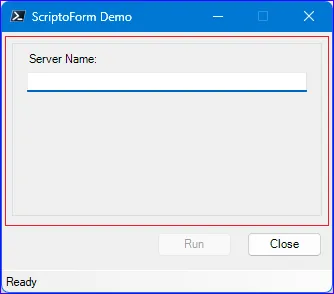
When a new ScriptoForm is built using the New-SADScriptoFormProject function, an empty GroupBox (
$GroupBoxMain) is provisioned in the script. The default “Run” and “Close” buttons are created outside of $GroupBoxMain and are added to $FormMain directly. When adding additional controls to a ScriptoForm it is generally recommended to add them to the $GroupBoxMain control. However, an additional GroupBox may need to be created for use with each secondary Form added to the ScriptoForm.The steps needed to implement a GroupBox control with a ScriptoForm include:
- Instantiate a GroupBox object in the Controls region.
Suggested name format: $GroupBoxName - Assign the required properties to the GroupBox object in the Forms region.
- Add the GroupBox object to a Form object in the Forms region.
- Add controls to the GroupBox object in the Forms region, as needed.
Examples
Section titled “Examples”- Instantiate a new
System.Windows.Forms.GroupBoxobject:Controls Regions $GroupBoxMain = New-Object -TypeName System.Windows.Forms.GroupBox - Assign properties to the GroupBox object and add it to the Form object:
Forms Region | $ShowMainForm $GroupBoxMain.Location = New-Object -TypeName System.Drawing.Point(10,5)$GroupBoxMain.Size = New-Object -TypeName System.Drawing.Size(($FormWidth - 20),($FormHeight - 80))$FormMain.Controls.Add($GroupBoxMain) - Add controls to the GroupBox object:
Forms Region | $ShowMainForm $LabelServerName.Location = New-Object -TypeName System.Drawing.Point(15,15)$LabelServerName.AutoSize = $true$LabelServerName.Text = "Server Name:"$GroupBoxMain.Controls.Add($LabelServerName)