ErrorProvider
In a ScriptoForm, the Microsoft .NET ErrorProvider class is a component used for triggering the display of a visible error indicator on a Control to notify the user of a data entry error. This indicator normally manifests itself in the form of a red “X” icon in the vicinity of the control in the error state and includes a tooltip that provides a customizable error message. A single ErrorProvider component can be used with multiple controls on a Form.
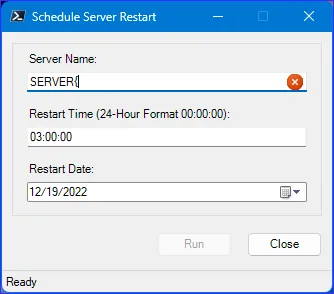 The error icon is displayed as a result of an invalid character typed by the user in the TextBox control.
The ErrorProvider component is also typically used in conjuction with enabling/disabling other controls on the form based on the error state that triggered it. For example, the “Run” Button on the form might be disabled preventing the user from continuing on with an action until the error state is corrected. The ErrorProvider indicates to the user of the problem and the Button is disabled at the same time. An Event Handler handles both state changes.
In the ScriptoForm PowerShell script file, a ErrorProvider component should be instantiated in the Controls region and then trigger by an event handler for a control within the Handlers region. If using the ScriptoForm VS Code snippets, the ScriptoForm Controls: ErrorProvider snippet can be used to instantiate this component. For aestectic purposes, the error icon is usually placed inside of a control using the
SetIconPadding() method with a negative value.The steps needed to implement a ErrorProvider component with a ScriptoForm include:
- Instantiate a ErrorProvider object in the Controls region.
Suggested name format: $ErrorProviderName - Set an error on a control using the
SetError()method when an error condition is detected in an Event Handler of the control in the Handlers region. - Clear an error on a control using the
ClearError()method when the control is no longer in an error state in an Event Handler of the control in the Handlers region.
Examples
Section titled “Examples”- Instantiate a new
System.Windows.Forms.ErrorProviderobject:Controls Region $ErrorProviderMain = New-Object -TypeName System.Windows.Forms.ErrorProvider - Set an error on a control when an error state is detected:
Handlers Region $ErrorProviderMain.SetIconPadding($TextBoxName,-20)$ErrorProviderMain.SetError($TextBoxName,"Error message.") - Clear the error on the control when the control is no longer in an error state:
Handlers Regions $ErrorProviderMain.Clear()
References
Section titled “References”ErrorProvider Class (System.Windows.Forms) | Microsoft Learn