Introduction
A ScriptoForm (pronounced script·o·form) is a highly structured, and opinionated, PowerShell script designed to display a Microsoft Windows Forms application. As a ScriptoForm developer, you provision a new ScriptoForm Project and then add additional custom code to the PowerShell script file to perform specific actions. The users of your ScriptoForm interact with the script using the form and the Controls you add to it. What makes this script file a ScriptoForm, and not just another PowerShell script, is that it provides you the initial code used to display a default Form in a predictable structure. The code in the script file is organized into Regions facilitating easy customization of the appearance and functionality of the form and script.
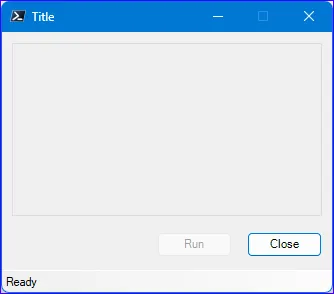 Pictured above is the default ScriptoForm built with the “Medium” size option. It includes functional “Run” and “Close” Buttons and StatusStrip and is ready for you to add additional controls and customize.
When a new ScriptoForm is built, additional files (aka “build files”) are also provided in the project folder that can be used to compile the script into an executable format using the latest Microsoft .NET Framework. This executable embeds the PowerShell script file into it, along with any additional support files used by the script, and launches it seamlessly with PowerShell when it is run. The underlying PowerShell console window is hidden by default giving it the appearance of a native Microsoft Windows Form application. Command-line arguments can be used with the executable to show the console window if needed and also to control which version of PowerShell is used to run the script.
To make creating a new ScriptoForm Project easy, a PowerShell module has been developed to scaffold out the initial script and build files for you. This module is available in the PowerShell Gallery and is free to use. It makes use of the popular Plaster PowerShell module to perform the scaffolding.
Quick Start
Section titled “Quick Start”The following articles will help you get up and running quickly to build your first ScriptoForm Project:
- Installation - get all the software and tools needed to work with the ScriptoForm framework
- Build a ScriptoForm - quickly build your first new ScriptoForm Project