DataGridView
In a ScriptoForm, the Microsoft .NET DataGridView class is a control that is used to provide a customizable and sortable table for displaying data to the user.
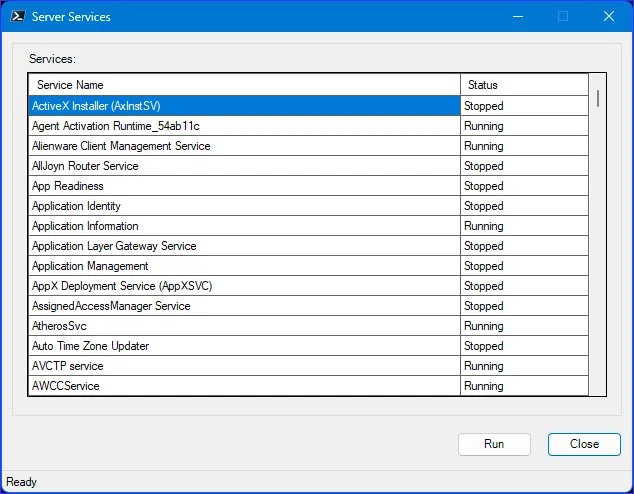
In the ScriptoForm PowerShell script file, a DataGridView control should be instantiated in the Controls region and then defined within the Forms script block. A DataGridView is usually paired with a matching Label control. By convention, this control pair should be nested in the
$GroupBoxMain GroupBox (as displayed in the above image) and is added to it rather than the main Form.The steps needed to implement a DataGridView control with a ScriptoForm include:
- Instantiate a DataGridView object and an associated Label object in the Controls region.
Suggested name format: $LabelName | $DataGridViewName - Assign the required and any optional properties to the ComboBox object in the Forms region.
- Populate the DataGridView with a list of items in an appropriate event handler in the Handlers region, as needed.
Examples
Section titled “Examples”- Instantiate a new
System.Windows.Forms.DataGridViewandSystem.Windows.Forms.Labelcontrol pair:Controls Region $LabelServices = New-Object -TypeName System.Windows.Forms.Label$DataGridViewServices = New-Object -TypeName System.Windows.Forms.DataGridView - Assign properties to the pair and add them to the GroupBox object:
Forms Region | $ShowMainForm $LabelServices.Location = New-Object -TypeName System.Drawing.Point(15,15)$LabelServices.AutoSize = $true$LabelServices.Text = "Environment:"$GroupBoxMain.Controls.Add($LabelServices)$DataGridViewServices.Location = New-Object -TypeName System.Drawing.Point(15,35)$DataGridViewServices.Size = New-Object -TypeName System.Drawing.Size(($FormWidth - 50),325)$DataGridViewServices.TabStop = $false$DataGridViewServices.RowTemplate.Height = 20$DataGridViewServices.DataBindings.DefaultDataSourceUpdateMode = [System.Windows.Forms.DataSourceUpdateMode]::OnValidation$DataGridViewServices.ScrollBars = [System.Windows.Forms.ScrollBars]::Vertical$DataGridViewServices.RowHeadersVisible = $false$DataGridViewServices.AllowUserToResizeRows = $false$DataGridViewServices.ReadOnly = $true$DataGridViewServices.AllowUserToAddRows = $false$DataGridViewServices.AllowUserToDeleteRows = $false$GroupBoxMain.Controls.Add($DataGridViewServices) - Populate the DataGridView object with a list of items:
Handlers Region | $ButtonRun_Click $ButtonRun_Click ={$ToolStripStatusLabelMain.Text = "Working...please wait"$FormMain.Controls | Where-Object {$PSItem -isnot [System.Windows.Forms.StatusStrip]} | ForEach-Object {$PSItem.Enabled = $false}$FormMain.Cursor = [System.Windows.Forms.Cursors]::WaitCursor[System.Windows.Forms.Application]::DoEvents()try{$Services = Get-Service -ErrorAction SilentlyContinue | Select-Object DisplayName, Status | Sort-Object DisplayNameif ($Services){$DataGridViewServices.ColumnCount = 2$DataGridViewServices.ColumnHeadersVisible = $true$DataGridViewServices.Columns[0].Name = "Service Name"$DataGridViewServices.Columns[1].Name = "Status"$DataGridViewServices.Rows.Clear()$Services | ForEach-Object {$DataGridViewServices.Rows.Add($PSItem.DisplayName, $PSItem.Status)}$ColumnCount = $DataGridViewServices.Columns.Count$LastColumnIndex = $ColumnCount - 1foreach ($Column in $DataGridViewServices.Columns){if ($Column.Index -eq $ColumnCount - $LastColumnIndex) {$Column.AutoSizeMode = [System.Windows.Forms.DataGridViewAutoSizeColumnMode]::Fill}else {$Column.AutoSizeMode = [System.Windows.Forms.DataGridViewAutoSizeColumnMode]::AllCells}$Column.SortMode = [System.Windows.Forms.DataGridViewColumnSortMode]::NotSortable$Column.SortMode = [System.Windows.Forms.DataGridViewColumnSortMode]::Automatic}$FormMain.Refresh()}else{[void][System.Windows.Forms.MessageBox]::Show("No services found on this computer.","Information",[System.Windows.Forms.MessageBoxButtons]::OK,[System.Windows.Forms.MessageBoxIcon]::Information)}}catch{[void][System.Windows.Forms.MessageBox]::Show($PSItem.Exception.Message + "`n`nPlease contact $SUPPORT_CONTACT for technical support.","Exception",[System.Windows.Forms.MessageBoxButtons]::OK,[System.Windows.Forms.MessageBoxIcon]::Warning)}$FormMain.Controls | ForEach-Object {$PSItem.Enabled = $true}$FormMain.ResetCursor()$ToolStripStatusLabelMain.Text = "Ready"$StatusStripMain.Update()}